
Version 1.1 · Last Updated 30 September 2026 · Tools and pricing snapshot: August 2026
Tracking pixels shifted from a technical implementation detail to a live regulatory exposure this year. For some background, read our statement on the OAIC pixels determinations. The practical consequence is that most organisations now need to be aware of exactly what is firing across their properties, what each pixel or tag is sending, to whom, on what trigger, and under what consent.
This guide covers the hands-on techniques for establishing a process that can cover these requirements. It sets out a six-step method, the register that should evolve from it, some comparisons of the types of tools available at various budget levels, and a working example using two free tools that will get a small site most of the way fairly quickly and easily. It also covers the two areas where conventional pixel audits tend to stop short, being server-side and edge tagging, where the browser may see only a request to your own domain, and mobile apps, where browser-based tooling is no help at all.
Who this guidance is for. It is written for anyone in an Australian organisation who adds, manages or is accountable for the tracking on its websites and apps. That includes privacy and compliance teams, marketing and ad-operations teams, web developers and digital product owners, and the agencies and technology partners who publish tags on their behalf. It applies equally to advertisers and publishers of any size, and you do not need specialist tools to start. If this is your first audit, begin with the working example. If you are building an ongoing process, focus on the tracker register and roles and responsibilities. If you run server-side tagging or apps, see step 2 and A Note on Apps. This is general industry guidance, not legal advice, and it is intended to sit alongside the governance frameworks and legal advice you already have in place.
Privacy reform status (updated 30th September 2026)
This guide reflects the Privacy Act 1988 and the Australian Privacy Principles (APPs) as they stand today. On 31 August 2026 the Government released an exposure draft of the tranche 2 reforms, the Privacy Amendment (Personal Data Protection) Bill 2026. It proposes:
- ‘fair and reasonable’ tests for collection, use and disclosure, replacing APPs 3, 4 and 6;
- consent requirements for trading personal information, which the consultation paper says can include pixel data shared for advertising;
- a broader definition of sensitive information;
- new data breach and data security obligations.
If these are enacted, the Permitted basis field in the tracker register below is the part most likely to change. Consultation closed on 18th September 2026, and the Bill could still change before it becomes law.
IAB Australia will update this guide once the reforms are finalised. Until then, make sure your partners and platforms are working to the current legal requirements.
Read more: Latest IAB Policy and regulation guidance
Key Takeaways
- Treat the audit as a living process, not a one-off scan. The output should be an owned, updatable tracker register.
- Discovery must go beyond the tag manager. Hard-coded tags, click/submit triggers, server-side containers and edge tagging are routinely missed.
- Consent testing must include storage checks (cookies, localStorage, sessionStorage), not just the Network tab.
- Server-side and app environments require different methods. Browser tools alone are insufficient.
- Ownership is the most common failure point. Use a simple RASCI to make accountability explicit.
- A capable first pass on a small or medium-sized site can be completed with free tools (DevTools + Blacklight) in an afternoon, for a limited set of representative templates and public flows. See the working example below.
The Suggested Six Steps
Any tools are only as good as the processes they serve. We recommend running the six steps below in order. For a concrete, zero-cost demonstration of the discovery and inspection steps on a website, see the working example using Browser DevTools and Blacklight later in this guide.
- 1. Define scope and assign ownership. List every domain, subdomain, microsite, landing page, checkout flow and embedded form, and name one accountable owner for the audit. Flag higher-risk areas for extra attention from the start: health, finance and children’s content, and logged-in portals.
- 2. Discover everything that fires, including server-side. Crawl each property and capture every outbound request: pixels, tags, SDKs, beacons. Do not simply trust a tag-manager container solution (e.g. Google Tag Manager) to function as the complete source of truth. Hard-coded tags and pixels can reside outside of containers such as GTM, and many trackers fire only on click, form submit, route change or purchase rather than on page load.
Critically, ask whether any tracking now runs server-side. To bypass browser restrictions, marketing teams increasingly route data server-side, and two setups matter here. A server-side GTM container (self-hosted or run through a tagging-server provider), or a CDN edge-tagging setup such as Cloudflare Zaraz, receives events on your own domain or infrastructure (your server, or the CDN edge in the case of Zaraz) and then shares them to popular platforms via solutions such as Meta’s Conversions API (CAPI), TikTok’s Events API or GA4 server-side.
Google Tag Gateway is a related but narrower setup that serves Google’s own tags (GA4, Google Ads and GTM) from a first-party subdomain on your site. It carries Google tags only and does not forward to Meta or TikTok.
In both cases the browser typically sees a request to your own domain (or the tagging provider’s). With Tag Gateway, the payload you see in DevTools is essentially what Google receives. With a tagging server or edge setup, data can be added or changed after the browser hop, so DevTools and Blacklight cannot see what is actually forwarded. Where either is in use, the audit should extend to the server-side container or gateway configuration (often cloud-hosted in Google Cloud, AWS or equivalent) and to server logs.
In practice, auditing a server-side setup means three checks:
Review the container configuration. Open the server-side GTM container (or the tagging-server provider’s dashboard) and list every configured client, tag and destination, exactly as you would for a web container.
Check forwarding destinations and data mappings. For each destination (Meta Conversions API, TikTok Events API, GA4), confirm which event parameters and user-data fields are mapped and forwarded. This is where hashed emails and phone numbers are commonly attached.
Sample the outbound logs. Pull a sample of outbound requests from the tagging server or CDN logs (Cloud Run, CloudFront or Zaraz logs, for example) and confirm what actually left, to whom, and with what payload.
Hosting or routing tracking through your own infrastructure does not remove the need to assess privacy obligations for the data handled before onward disclosure. Consider the data collected, its purpose, recipients, notice, consent where applicable, and the security controls for the server-side hop.
- 3. Classify each tracker. For every item, record the tool name (Meta pixel, GA4, TikTok, Floodlight, LinkedIn Insight Tag, custom endpoint), the business owner, where it appears, what triggers it, what it sends, and why it exists. Anything with no defensible purpose is a candidate for removal.
- 4. Inspect the actual payloads. Read the raw requests, not just the vendor dashboard. Are full URLs revealing sensitive context? Are form-field values (even hashed names, emails or phone numbers) being shipped to a platform? Are search terms or symptom questionnaire clicks leaking? Moving tracking from the browser to a server-side pathway does not, by itself, remove the need to assess collection, use, and disclosure under the Australian Privacy Principles (APPs). Hashing an email address or phone number also does not automatically remove privacy risk, particularly where a recipient can match the identifier to an individual. In practice, a hashed email sent to Meta via CAPI should be treated with the same care as one sent via a browser pixel. Most platform destinations are overseas, so disclosing data to them also engages APP 8 (cross-border disclosure). Note this against the Destination field in your register.
- 5. Test under each consent state. Load the site as a first-time visitor and confirm that nothing fires which your consent model says should wait. The right bar depends on your organisation’s consent model and the pages involved, so confirm that model with your privacy and legal advisers and test against it, taking extra care on pages involving sensitive information. Then test each state your banner offers: ‘Reject all’, essentials only, ‘Accept all’, and a change of mind part-way through a visit, which should stop tags and clear stored identifiers without a page reload. Do not rely on the Network tab alone. Open the DevTools Application tab and confirm that no tracking cookies, localStorage or sessionStorage identifiers were written after rejection, as a script can suppress its immediate network call yet still store an identifier that is sent on the next page or return visit. If the site uses Google Consent Mode in its advanced setup, Google tags will still send cookieless pings after rejection. Expect these, and record them in the register with the organisation’s position on them rather than logging them as a blocking failure. One of the most common technical failures is a consent banner that looks compliant but does not actually block scripts, usually because a new tag was added to the container (typically via GTM) without updating the consent tool’s categorisation. The working example below shows these tests step by step.
- 6. Document, remediate, and schedule the re-run. Record findings, fix or remove what fails, align your privacy policy and collection notice with what the site actually does, and schedule recurring scans. A practical baseline is a full review at least quarterly (more frequently for high-change properties), plus a triggered re-scan after any significant container publish, major site release, or addition of a new marketing partner. Review regularly, as any single audit is a snapshot that is stale the moment an ad-ops or agency partner publishes a change in their tag container. For how to prioritise findings, and the typical fixes, see Prioritising Remediation below.
Your Tracker Register
The output of the method should be a living register, not a one-off report. Recording a consistent set of fields for every tracker is what makes the audit defensible to a regulator and survivable across staff and agency changes.
At minimum, capture:
| Field | What to record |
|---|---|
| Tracker / tool name | Meta pixel, GA4, TikTok, Floodlight, LinkedIn Insight Tag, custom endpoint, etc. |
| Business owner | The named team or person accountable, not marketing in the abstract. |
| Purpose | The specific reason it exists (attribution, remarketing, analytics, conversion measurement). |
| Permitted basis | The basis for collection, notice, use and disclosure under the APPs, and whether consent is required. For example: APP 3 (collection, including express consent for sensitive information under APP 3.3), APP 5 (notice at or before collection), APP 6 (use and disclosure), APP 7 (direct marketing) and APP 8 where the recipient is overseas. |
| Data fields sent | The actual fields transmitted, including any form values or identifiers. |
| Destination | The recipient platform or endpoint, including any server-side path. Where the recipient is overseas, as most platform destinations are, disclosure to it engages APP 8. |
| Trigger and location | What causes it to fire and which pages or flows it runs on. |
| Consent state | Whether it requires consent and whether that is genuinely enforced and tested, not simply assumed. |
| Last reviewed | The date the entry was last verified, and by whom. |
| Deployment method | Hard-coded in the page, via Google Tag Manager (GTM), or server-side (a tagging server or Google Tag Gateway). This tells you where to go to change or remove it. |
| Container build / publish ID | Where tags change often, the GTM container version or publish ID (or commit reference) that was active when the entry was verified, so changes can be traced chronologically. |
| Evidence retained / link | A pointer to the proof behind the entry: scan export, screenshot, redacted HAR capture, container or configuration export, log sample, consent-test record, remediation ticket or re-test result. |
Example Register Entry:
| Field | Example value |
|---|---|
| Tracker / tool name | Meta Pixel (browser) + Conversions API (server-side) |
| Business owner | Performance Marketing Lead |
| Purpose | Conversion measurement and optimised bidding for paid social |
| Permitted basis | Collection reasonably necessary for conversion measurement (APP 3), notified at or before collection (APP 5), used and disclosed for that purpose (APP 6), with a working opt-out for any direct marketing use (APP 7). Organisation practice: prior marketing consent. Express consent required wherever sensitive information could be involved (APP 3.3). |
| Data fields sent | event_name, content_ids, value, currency, em (hashed), ph (hashed). No free-text form fields. |
| Destination | Meta, via browser pixel and server-side CAPI through sGTM. Overseas recipient (APP 8). |
| Trigger and location | Purchase event on /checkout/confirmation only |
| Consent state | Requires marketing consent. Verified blocked on “Reject all” (Network + Application tabs) |
| Last reviewed | 19 Aug 2026, Ad Ops Lead |
| Deployment method | GTM web container + server-side GTM (Cloud Run) |
| Container build / publish ID | GTM-XXXXX – Version 47 (published 12 Aug 2026) |
| Evidence retained / link | Consent-state test capture, redacted HAR file, sGTM configuration export, GTM Version 47 review record |
Replace the example values with live data from your own audit. The format above is deliberately complete so that a new team member or agency partner can understand both the technical and the accountability context without further explanation.
Some Available Tools
Four categories get conflated constantly, so it is worth separating them by function before considering budgets:
- Discovery scanners crawl a site and report what is firing. Good for inventory and spot checks.
- Browser / network inspection (DevTools, vendor debuggers) shows the live request detail for a page you are on. Good for reading payloads.
- Consent management platforms (CMPs) collect consent and block trackers until it is given. Most include a scanner, but a CMP is not an audit, and installing one is not compliance. Configuration is what gets judged, not presence.
- Continuous governance / monitoring platforms scan at scale on a schedule, validate that consent actually suppresses tags, and alert when something new appears. This is the enterprise answer to ongoing monitoring and should cover client-side tags and tag containers.
The tables below organise tools by budget, because that is how most operators make the decision. The categories above tell you what each one is actually for.
Free and near-free
| Example tool | What it does | Notes |
|---|---|---|
| Browser DevTools (Network tab) | Shows every outbound request in real time as you click through the site | Free, built into Chrome / Edge / Firefox. An honest baseline. Filter for platform domains and read payloads directly. |
| Blacklight (The Markup) | One-click scan with a plain-English overview of trackers, ad pixels and session recorders | Free, web-based, no install. Best for a fast first look, but not full coverage. |
| Wappalyzer | Browser extension and web profiler that surfaces the full technology stack in one click: analytics, advertising, CMPs and more | Free tier. A quick complement to Blacklight for a broader view of what a property is running. |
| BuiltWith | Web-based profile of the tracking, analytics and advertising technologies present on a domain | Free tier available. Fast, high-level orientation before deeper inspection. |
| EDPB Website Auditing Tool | Open-source desktop tool that detects cookies and trackers, with exportable results | Free and open-source. More thorough than Blacklight; slightly more technical to run. |
| Privacy browser extensions | Ghostery, Privacy Badger, uBlock Origin’s logger and Brave Shields surface and/or block trackers as you browse | Free. Useful for ad-hoc inspection, but coverage varies and blocking changes what the page loads, so they are not a source of truth for an audit. |
| ObservePoint Debugger | Free extension showing tags, cookies and the data each sends, with Global Privacy Control (GPC) signal simulation | Free entry point to an enterprise platform; ObservePoint also offers a limited free scan. |
| Vendor debuggers | Meta Pixel Helper and Google Tag Assistant confirm exactly what those specific platforms are receiving | Free. The platform’s own debugger is often the clearest view of what you are sending it. |
A capable internal person can run a credible audit of a small site with nothing more than the Network tab, Blacklight and the EDPB tool. The limitation is coverage and recurrence: these tools are largely manual and single-page, offer no scheduling or alerting, are weaker on authenticated flows and single-page applications, and are completely blind to server-side traffic. They are superb for an initial inventory and for spot checks, but they are not a complete ongoing program.
Mid-market / lower-cost paid
Most CMPs with built-in scanning are sensible options for SMEs and mid-sized sites that need consent collection and periodic discovery without enterprise overhead.
| Example tool | Who it is for | Pricing considerations |
|---|---|---|
| Cookiebot (by Usercentrics) |
Small-to-mid sites wanting fast setup and automated scanning with script blocking | Tiered pricing per domain per month, billed by sub-page count, which can jump unexpectedly. |
| CookieYes | Budget consent and scanning for small sites | Low-cost. Like many CMPs, script-blocking can miss async or dynamically loaded scripts if categorisation and blocking rules are not carefully configured. |
| iubenda | Small businesses wanting consent plus generated privacy / cookie policies | Mid-range; strong on policy generation. |
| Termly | Smaller sites needing consent and scanning | Free tier plus low-cost paid plans. |
| Complianz | WordPress sites specifically | Plugin-based and inexpensive; a good fit if you are on WordPress. |
| Enzuzo | Mid-market and Shopify (native integration) | Page-count pricing with a free tier. |
The recurring trap across all of these: deploying the banner is the easy part; ensuring scripts are correctly categorised and reliably blocked before consent is the harder, ongoing work. New tags added to a container (or hard-coded into the page) without updating the CMP’s declaration are the usual cause of a compliant-looking site that still leaks.
Enterprise
For larger organisations, regulated sectors and anyone needing defensible, continuous governance rather than a quarterly snapshot. For procurement, the category matters as much as the brand: you are buying a broad privacy / GRC suite, a publisher-grade CMP, tag governance, or consent validation.
What ‘enterprise-grade’ actually buys is scale and repeatability: scheduled scans across large estates, alerting when a new or unexpected tag appears or consent behaviour drifts, re-scans triggered by releases or container changes (including CI/CD integration), audit-ready exportable reports, and integration with the tag management system (GTM, Tealium) or cloud logging already in place. In procurement, look for explicit support for consent-signal validation (not just CMP presence), client-side plus server-side coverage, and multi-property alerting.
| Category & Example Tools | Strength | Notes |
|---|---|---|
| Broad privacy / GRC suite (OneTrust) | Consent, data mapping, DSARs, vendor and AI governance in one platform | Most comprehensive and most complex to configure. |
| Publisher-grade CMPs (Didomi, including Sourcepoint; TrustArc; Osano) |
Consent across web and app, multi-region, IAB TCF support | Quote-based. Didomi’s Sourcepoint acquisition deepened its publisher footprint; Osano bills per domain, which compounds across large estates. |
| Tag governance / monitoring (ObservePoint, Tag Inspector) | Automated scheduled scans at scale; validates that consent suppresses tags; alerts on new or unexpected trackers | The category that answers ongoing monitoring. Complements rather than replaces a CMP. |
| Consent validation / audit reporting (DataTrue) | Consent validation and audit-ready reporting | Useful where the priority is provable, repeatable consent testing. |
| Server-side / edge validation (an approach, not a single product) | Validates server-side GTM container configurations, edge rules (e.g. Cloudflare Zaraz) and forwarding destinations; samples outbound server / CDN logs | Essential for heavy server-side estates. Some tag-governance platforms are extending here; otherwise this is cloud-console and log-sampling work (see step 2). |
Pricing and ownership details are indicative as of August 2026 and change frequently. Treat them as directional, not quotable, and confirm current pricing directly with the vendors.
A CMP can govern consent at the front door; a monitoring platform (ObservePoint, DataTrue, Tag Inspector) is the smoke alarm that keeps watching after the audit. Mature programs run both.
A Working Example: auditing with two free tools
The fastest way to understand what your site is doing is to look. Between them, these two free tools cover the two halves of discovery: Blacklight maps what is present in a single click, and the browser’s own developer tools let you read exactly what each tracker sends. Neither needs a budget or an install, and together they will tell you more in an afternoon than most procurement exercises manage in a month. Blacklight looks at one page at a time, and at page-load behaviour only; DevTools shows whatever happens as you browse and interact. Run both across your key templates: a home page, a category or content page, a sensitive page, and the checkout or enquiry flow.
Reading live requests with Browser DevTools
DevTools is built into Chrome, Edge and Firefox. The Network tab lists every request a page makes, so you can see precisely which third parties are called and what travels to them. Work in a private or incognito window so existing cookies and a prior consent choice do not skew the picture.
1. Open the page and the panel. In a private window, load the page, then press F12 (or right-click and choose Inspect) and select the Network tab.
2. Record from the first byte. Tick ‘preserve log’ then reload the page so the list captures everything from load, including anything that fires before a consent banner appears.
3. Filter out the noise. In the filter box, type a platform domain: facebook, tiktok, collect (for Google Analytics), doubleclick or linkedin. Each remaining row is a request leaving the browser to that third party. If a platform filter returns nothing yet you still suspect tracking, the data may be routed through a first-party subdomain (such as metrics.yourcompany.com.au) or a generic path like /track to dodge the filter; clear the filter, sort by the Type column (fetch/xhr or script) and scan for unfamiliar destinations by hand. A request to your own subdomain is not a clean bill of health: it may be a gateway or server-side hop that forwards to the platforms behind the scenes, so treat it as a prompt to audit the server-side configuration (step 2).
4. Read the payload. Click a request and open its Headers and Payload (or Query String) tabs. This is the part that matters: it shows the destination and the actual data being sent, such as page URLs, event names, and any identifiers or form values. For GET requests (most pixels) these sit under Query String Parameters; for POST requests the fields are in the Payload (request body), often as JSON, so check both.
5. Test the interactions, not just the load. With the log still recording, submit a form, move through a funnel, or complete a test purchase. Many tags fire only on these actions; watch the new requests appear and inspect them the same way.
6. Record what you find. For each tracker, note the destination, the trigger and the fields in the payload against your register.
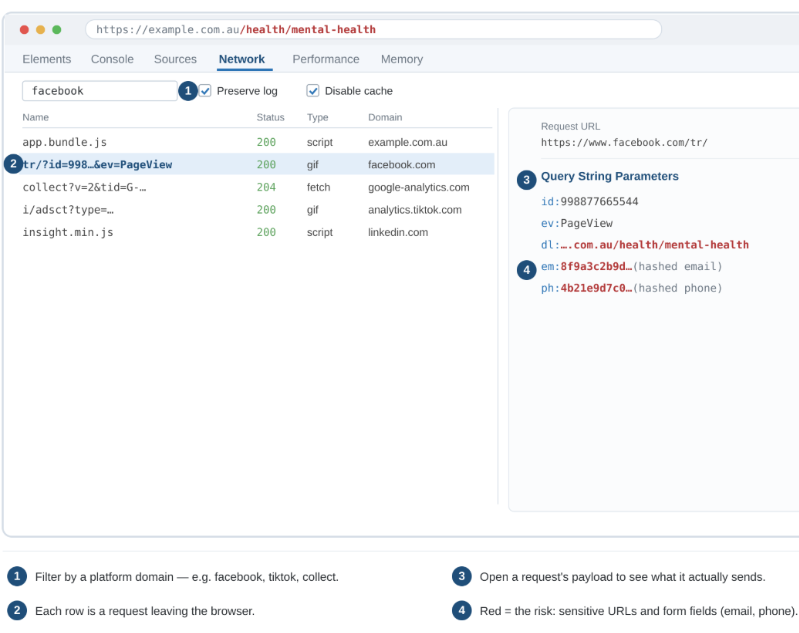
What to watch out for. A full, sensitive URL in the payload (a path such as /health/mental-health); an email or phone field (often em and ph on the Meta pixel, hashed or not); or any tracker that fires before consent is given. Any of these is a finding to record and remediate.
Testing consent states with DevTools
This is step 5 of the method in practice, and the test most likely to surface a real finding. Start each run in a fresh private window, so anything you find was written during that visit.
1. Load the page and make no choice. With the Network tab recording and ‘Preserve log’ ticked, load a key template and leave the consent banner untouched. Anything your consent model says should wait must not appear yet.
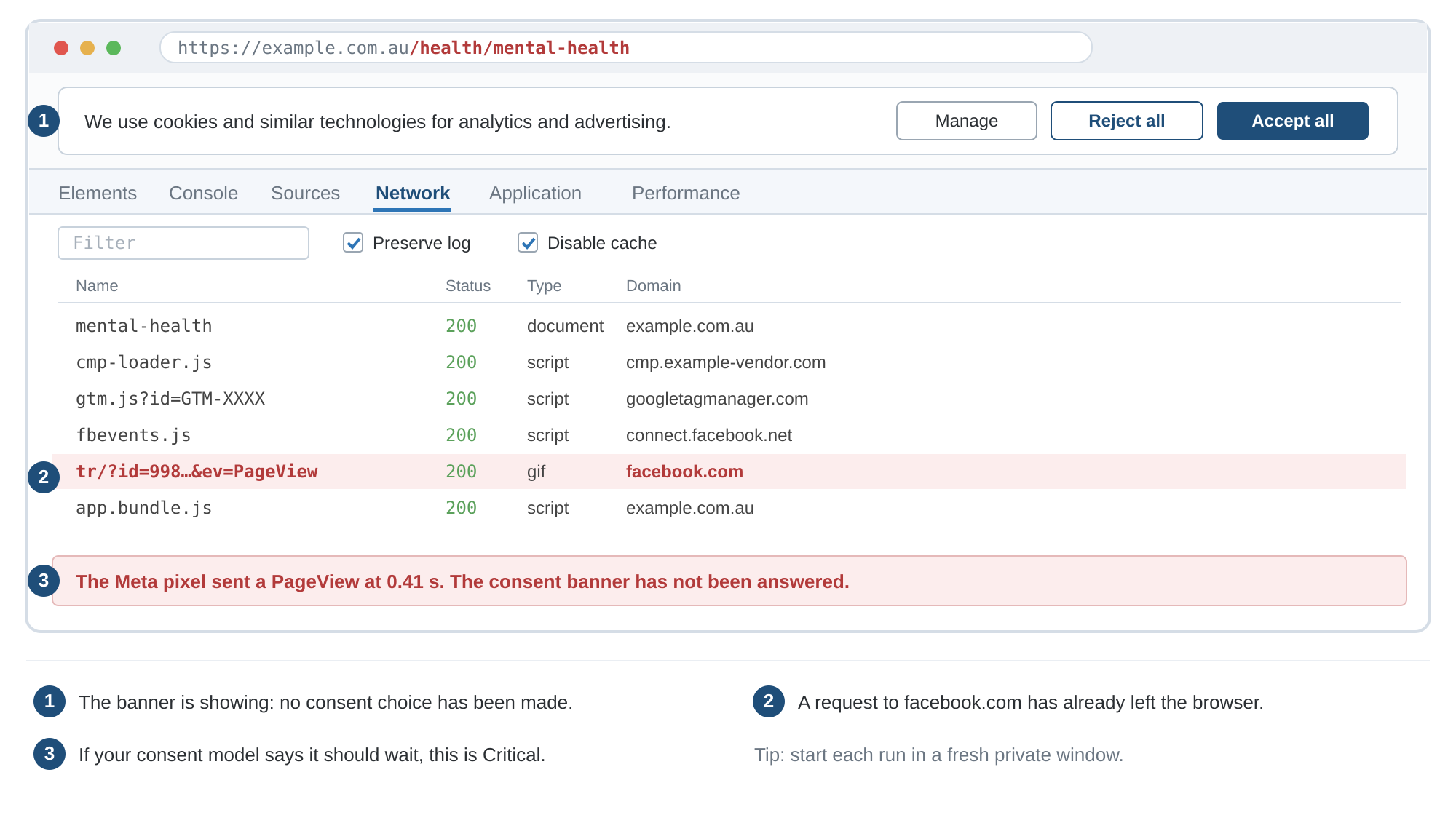
Illustrative: first load, before any consent choice. A request to the Meta pixel has already left the browser.
2. Click ‘Reject all’ and keep recording. Move to another page and repeat a key interaction. Requests to Meta, TikTok, LinkedIn and other platforms should stop. If the site uses Google Consent Mode in its advanced setup, cookieless pings to Google will continue (look for a gcs=G100 parameter). Record them against the organisation’s position on them rather than logging them as a failure.
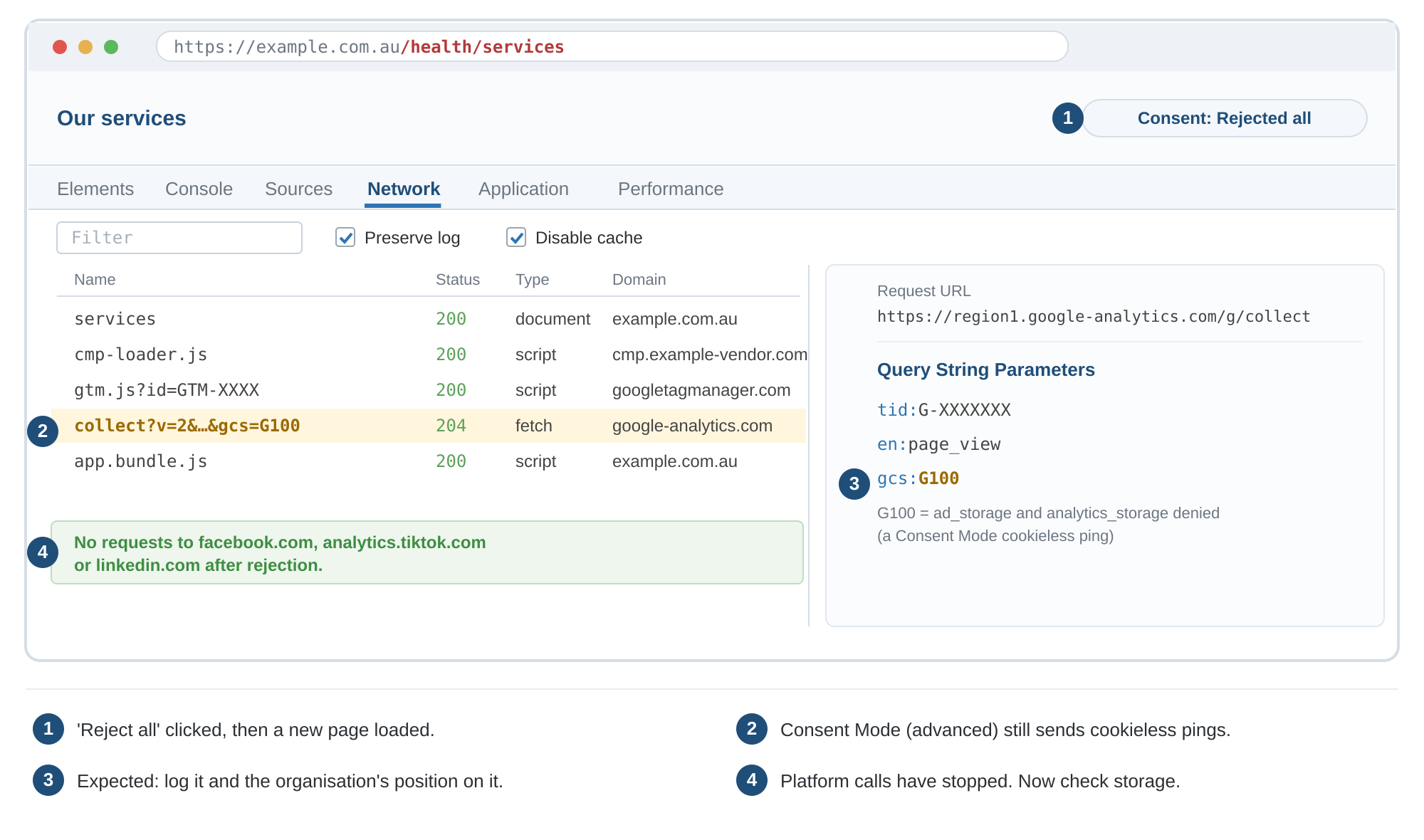
Illustrative: the next page after ‘Reject all’. Platform requests have stopped; the remaining Google request is a Consent Mode cookieless ping (gcs=G100).
3. Check storage, not just traffic. Open the Application tab and look under Cookies, Local storage and Session storage. Your CMP’s own consent record is expected. A platform identifier such as _fbp, _ga or _ttp written after rejection is a finding, even if the Network tab looks clean, because it can be read and sent on the next page or a return visit.
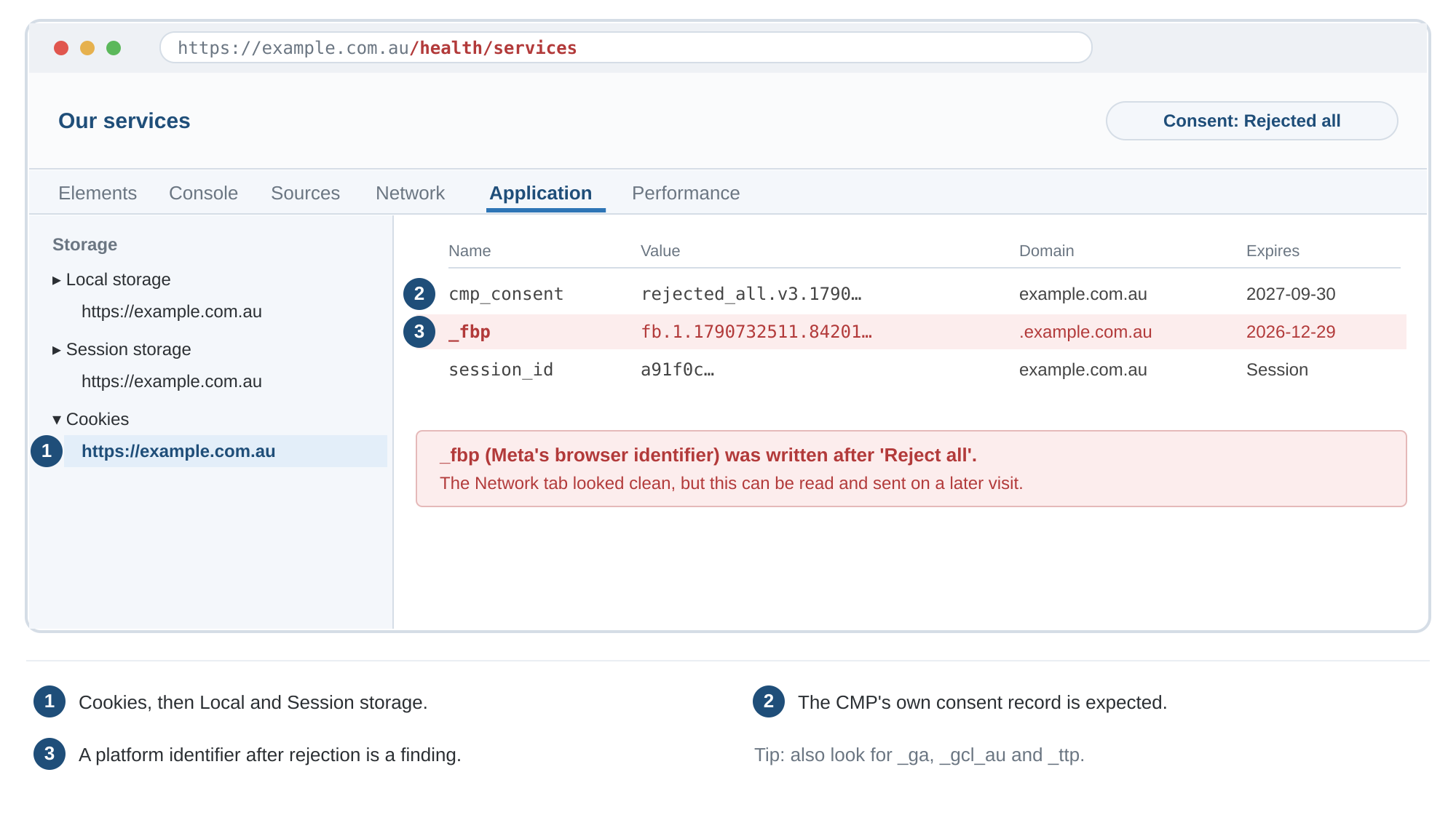
Illustrative: the Application tab after ‘Reject all’. The Network tab looked clean, but Meta’s _fbp identifier was still written to a cookie.
4. Repeat for each state your banner offers. Test essentials only, ‘Accept all’, and a change of mind part-way through a visit. Record each result in the register’s Consent state and Evidence fields.
A one-click overview with Blacklight:
Blacklight, from the newsroom The Markup, scans a single public URL and returns a plain-English inventory of the tracking it finds, including ad trackers, third-party cookies, session recorders, and the presence of the major platforms. It is the quickest way to get oriented before you start reading payloads.
1. Enter the page URL. Go to themarkup.org/blacklight and paste in the address of the page you want to check. It inspects one page at a time, so run it on each key template separately. As an external, unauthenticated crawler it also cannot see anything behind a login, so authenticated areas (such as account dashboards, patient portals, post-login forms) must be audited manually in DevTools, which is often where the highest-risk tracking sits.
2. Let the scan run. The automated inspection takes roughly half a minute as it loads the page and watches what it contacts.
3. Read the summary. The result cards count the third-party cookies, ad trackers and any session-recording or keystroke-capture services, and flag whether the Meta, Google, TikTok and X pixels are present.
4. See who receives the data. Expand each section to list the specific companies the page is sharing with.
5. Confirm in DevTools. Blacklight tells you what is present; switch to DevTools to read exactly what each one sends, and to catch the click- and submit-triggered tags Blacklight cannot see.
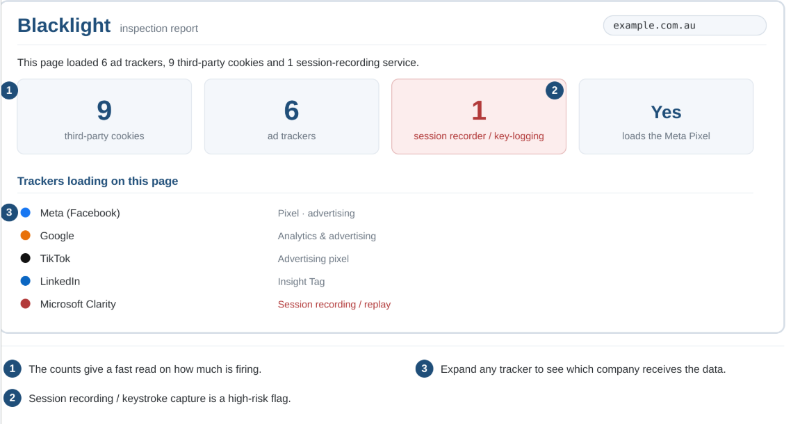
Used together, a suggested approach for these two example tools is simple: Blacklight to map the territory, DevTools to read the detail, and the register to record both. Neither will catch server-side traffic (see step 2 of the method) or app SDKs, but for the website front end, this is a quick, capable and zero-cost audit.
Single-page applications, dynamic content and authenticated areas
Browser-based discovery tools (including DevTools and Blacklight) are weaker on single-page applications and post-login experiences. Many high-risk trackers only fire on route changes, virtual pageviews, form interactions inside authenticated areas, or after a user has logged in.
Practical approaches:
- In DevTools, keep the Network log recording while navigating between routes or completing key flows (search → product → cart → checkout, or login → account dashboard → form submission). Watch for new requests that appear only after navigation or interaction.
- Treat authenticated areas (account portals, patient portals, logged-in dashboards, post-login forms) as a separate scope item. These often cannot be reached by external scanners and must be inspected manually while logged in.
- Where a tag manager is used, check for History Change or custom event triggers in addition to Page View triggers. These are commonly used on SPAs and are easy to miss if you only test initial page load.
If the property is heavily SPA-based or has material authenticated tracking, factor extra time into the discovery step and do not rely solely on load-time scans.
A Note on Apps
Auditing an app is genuinely harder than a website, and the website method does not translate cleanly. Apps leak through embedded third-party SDKs, server-to-server calls, and OS-level device identifiers and fingerprints even when there is no visible pixel. Browser-based tools therefore help only with in-app web pages, as covered in step 3 below.
Two further complications make the work more technical:
- App traffic is encrypted. Inspecting it requires intercepting TLS on a controlled test device, with careful certificate handling.
- On Android, apps often ignore user-installed certificates by default. Certificate pinning can block interception on hardened apps; specialists work around it on test builds.
The same six steps apply, with app-specific methods at each stage:
- Scope. List every app, platform and current build version in use. Treat iOS and Android separately, because their SDK footprints often differ.
- Inventory the SDKs. Start with what the app owner already holds: the dependency list and, for iOS, the privacy report Xcode generates from the privacy manifests bundled with the app and its SDKs. For Android, Exodus Privacy (free, open-source) lists the trackers and permissions in a build without running it. Compare both against Apple’s privacy labels and Google Play’s Data Safety section, which are self-declarations and often lag actual SDK behaviour.
- Observe live traffic. On iOS, the on-device App Privacy Report (in Settings) logs the domains each app contacts, which makes it a free first live check. For payload-level detail, intercept traffic on a controlled test device with Charles Proxy (commercial, relatively easy) or mitmproxy / Burp Suite (free, more capable). In-app web pages such as checkout and forms often load the same web pixels; where the build allows debugging, they can be inspected with Safari Web Inspector or Chrome remote debugging.
- Inspect payloads. Record which identifiers (advertising IDs, email, phone, hashed values) and event fields each SDK sends, and to whom. Static analysis shows what is bundled; only interception shows what is actually transmitted.
- Test consent states. Repeat the traffic capture after declining the App Tracking Transparency (ATT) prompt and after refusing consent in any in-app consent tool. Declining ATT is meant to stop tracking across other companies’ apps and websites by any means, not just access to the advertising identifier, so check whether SDKs still send email, phone or other identifiers to ad platforms after a decline.
- Record and re-test. Log findings in the register by platform and app version, and re-test on every release that adds or updates an SDK.
Common high-risk patterns to watch for:
- Meta / Facebook SDK (especially with Advanced Matching or App Events enabled).
- Google Analytics / Firebase / Google Ads SDKs.
- Attribution and measurement SDKs (Adjust, AppsFlyer, Branch, Kochava, Singular).
- Session-replay or analytics SDKs that capture screen content or form input.
- Any SDK that requests or transmits advertising identifiers, email, phone, or hashed identifiers by default.
Store-level controls are not a compliance solution. ATT is a permission prompt rather than a technical block, and Google Play’s Data Safety section is a self-declaration rather than an enforcement control. Neither tells you what your SDKs actually send; only traffic interception does.
When to escalate
For most operators the pragmatic approach is to lean on store disclosures and Exodus Privacy for a first pass. Commission specialist proxy-based analysis (or a dedicated mobile privacy review) when:
- the app handles sensitive information or serves vulnerable users,
- static analysis surfaces multiple high-risk SDKs, or
- there is evidence of unexpected network destinations or data fields.
Prioritising Remediation
Not every finding carries the same urgency. Use a simple prioritisation lens so teams fix the highest-risk issues first rather than treating every tracker equally.
| Priority | Typical Findings | Suggested Response |
|---|---|---|
| Critical |
|
Immediate containment. Disable the tracker or move it behind genuine consent. Review Advanced Matching and server-side data mappings. |
| High |
|
Remediate within the current sprint or release cycle. Update CMP categorisation, tag-container rules, and server-side forwarding settings. |
| Medium |
|
Schedule for the next planned review. Minimise unnecessary third-party disclosure and identifiers, and apply available data-minimisation settings. |
| Low / Monitor |
|
Record in the tracker register and re-verify during the next scheduled scan or relevant change trigger. |
Typical fixes remain practical: move non-essential events behind genuine consent, disable or tightly scope Advanced Matching, exclude sensitive paths and form fields via GTM variables or platform settings, and remove tags that no longer have a defensible purpose. Moving an event server-side is not a fix in itself: a server-side path needs the same consent gating as the browser pixel, plus an explicit allow-list of the fields it forwards. Also, escalate any potential unlawful collection, disclosure, or sensitive-information handling to the organisation’s privacy and legal advisers promptly. This general industry guidance does not determine legal compliance.
A Suggested Practical Operating Model
- Generate a current, owned register of every tracker (what it sends, to whom, why, and under what consent) and defend each entry.
- Trackers are configured to minimise collection: limited-data settings on, Advanced Matching reviewed or disabled where not essential, sensitive URLs and form fields excluded from what is transmitted.
- Hashing does not, by itself, remove privacy risk or remove the need to assess a disclosure, particularly where the recipient can match the identifier to an individual.
- Nothing fires before the consent your model requires (under IAB recommended practice, nothing non-essential; on sensitive pages, always), and ‘Reject all’ genuinely silences trackers and stops identifiers being stored, verified by testing rather than assumed from the banner.
- Your privacy policy and collection notice match reality. Identify the platforms and other recipients with which data is shared, and offer a simple opt‑out where appropriate.
- Scans recur on a defined cadence and on defined triggers. A practical baseline for most organisations is a full review at least quarterly (more frequently for high-change properties), plus a triggered re-scan after any significant GTM/container publish, major site release, or addition of a new marketing partner. Where tooling supports it, configure alerts for new or unexpected trackers on both the front end and server-side, and reconcile every alert back to the register.
- Agency and platform partners give advance notice of container publishes and tag changes, publishes are logged, and each significant publish triggers a re-scan. An unannounced container change is treated as an incident to investigate, not business as usual.
- Evidence is retained for each audit cycle — scan exports, consent-test captures, container versions, log samples and remediation tickets — and linked from the register, so that findings and fixes can be demonstrated later rather than merely asserted.
- Regularly review the details of any and all partner contracts, and understand the practical details of how each related solution functions.
- When running an audit and establishing processes, consider the different roles involved and use a simple RASCI matrix to help manage the moving parts. See the example below.
Before any new tag goes live
The audit catches problems after the fact. The cheaper control is a gate before deployment, which is also the due diligence the OAIC expects. No new pixel, tag or SDK should be published until:
- it has a named business owner and a specific purpose;
- the data fields it will send, and its destination (including any server-side path and whether the recipient is overseas), are documented;
- its consent category is set in the CMP and tested;
- its register row exists before publication, not after;
- for sensitive contexts (health, finance, children and logged-in areas), a privacy impact assessment has been completed.
Agencies and partners with publish rights should work to the same gate (see Agency-managed containers and change control, below).
Roles and Responsibilities
Tracker audits often fail on ownership and communications, more often than they fail on tooling. The recurring pattern is familiar… marketing adds a tag, an agency publishes the container, engineering owns the server-side infrastructure, legal owns the privacy policy, and nobody owns the key question of whether what is actually leaving the site is defensible. Every team can be doing its own job correctly while the organisation still leaks.
A RASCI matrix is a simple way to help close that gap. Each row is an activity and each column is a role, and every cell carries one of five markers as per the below:
- R – Responsible. Does the work. There can be more than one.
- A – Accountable. Owns the outcome and signs it off. Exactly one person should be accountable for each activity.
- S – Supporting. Actively helps the responsible party: supplies access, runs a script, pulls the logs.
- C – Consulted. Gives input before the decision is made. Two-way.
- I – Informed. Told once it is done. One-way.
Setting this out does two things that are important. It makes the audit survivable across staff and agency changes, which is the same argument that applies to the register, extended from what fires to who owns it. Also it makes the audit demonstrable with a named accountable owner for each activity – which is evidence of a governance process rather than an ad-hoc scan.
See below for an example – and all the roles are illustrative. In small-mid sized businesses often one person will wear any number of these hats. This is fine, provided the accountable column still resolves to a single name in every row.
| Activity | Responsible | Accountable | Supporting | Consulted | Informed |
|---|---|---|---|---|---|
| Define scope and ownership | Privacy / compliance lead | Executive sponsor | Web dev, ad ops | Legal, agency | Business unit owners |
| Discovery (client and server-side) | Ad ops | Privacy / compliance lead | Web dev, cloud / infrastructure | Agency, martech vendors | Legal |
| Classification and payload inspection | Ad ops | Privacy / compliance lead | Web dev | Legal | Marketing owners |
| Consent-state testing | Web dev | Privacy / compliance lead | Ad ops, CMP vendor | Legal | Marketing |
| Remediation | Ad ops, web dev | Business owner of the tracker | CMP vendor, agency | Privacy, legal | Executive sponsor |
| Policy and collection notice alignment | Legal | Privacy / compliance lead | Marketing | Ad ops | Executive sponsor |
| Register upkeep and scheduled re-run | Ad ops | Privacy / compliance lead | Web dev | Agency | Executive sponsor, legal |
Note one deliberate choice – accountability for remediation sits with the business owner of the tracker rather than with the privacy team, because the privacy team can identify a problem, but is rarely the party that can authorise switching off a tag attached to revenue.
Agency-managed containers and change control
A significant proportion of tracking on Australian sites is published by agencies rather than in-house teams. When this is the case, the register and RASCI alone are not enough. The practical controls need to sit in the commercial relationship.
At minimum, consider requiring in the SOW or MSA:
- Advance notification (or same-day notification) of any container publish that adds, removes or materially changes a tracker.
- Named accountable contact at the agency for the container, with a requirement to keep that name current.
- Read access (or export rights) to the live container and publish history so the client can verify the register against what is actually live.
- Explicit agreement that no new non-essential tracker is added without prior client approval (or at least documented notification).
- A simple change log or publish ID that can be recorded against the register entry.
Without these, the audit becomes a snapshot that is obsolete the moment the agency next publishes. The same principle applies to any third-party that has publish rights (media agencies, performance partners, or specialised measurement vendors).